MCP & ACP: The Protocol Wars
Model Context Protocol (MCP) and Agent Communication Protocol (ACP) are the two main protocols for connecting agents to external tools and services. This page audits how each agent implements, supports, or ignores them.
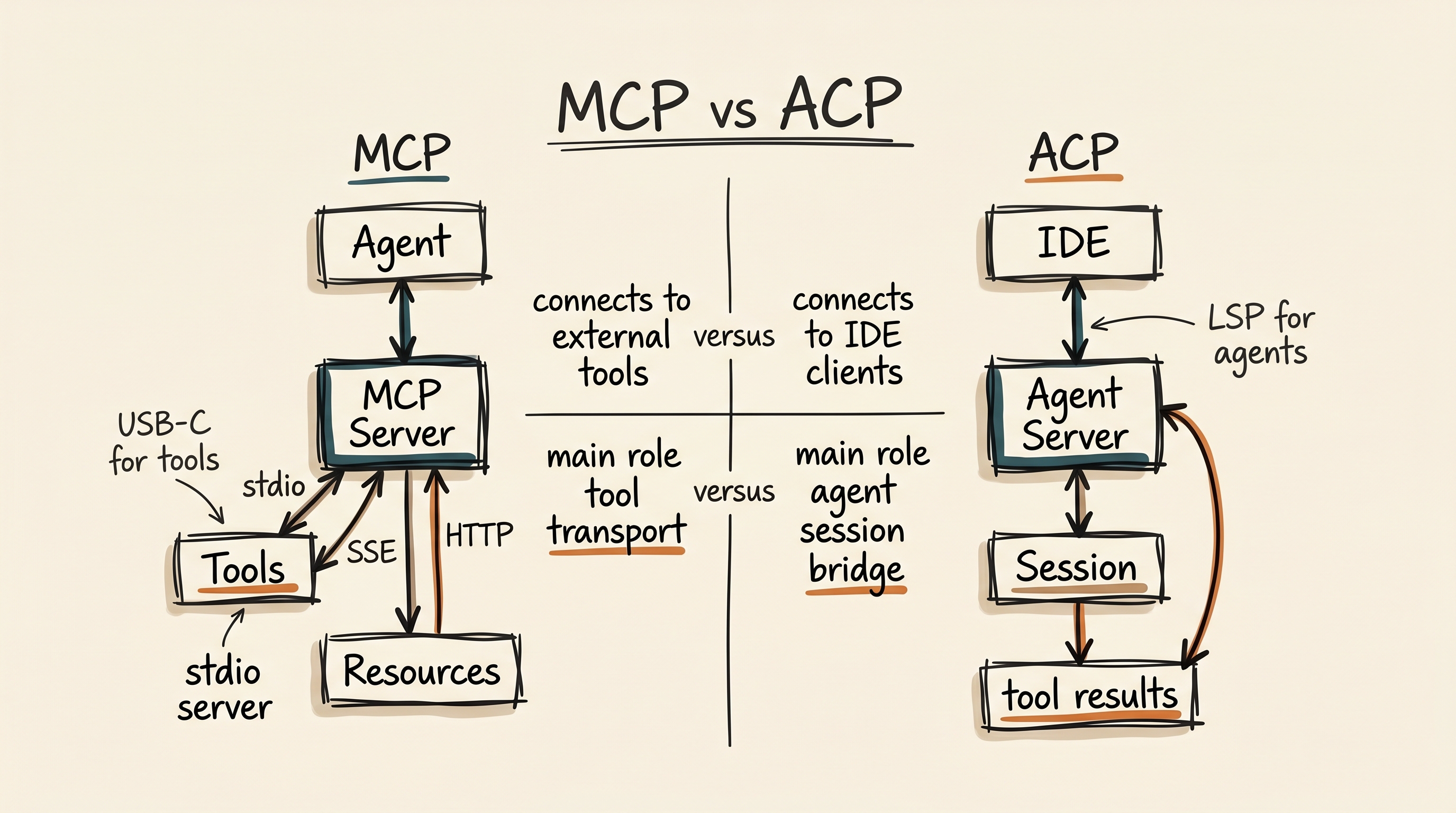
What are MCP and ACP?
MCP — Model Context Protocol
Anthropic's open protocol for connecting LLMs to external tools and data sources. MCP servers expose capabilities as named tools with JSON schemas. Agents act as MCP clients, discovering and invoking tools via JSON-RPC over stdio, SSE, or HTTP transports.
Think of it as "USB-C for AI" — a standard way for any agent to connect to any tool server without custom integration code.
ACP — Agent Communication Protocol
A protocol for agent-to-agent communication, primarily used for IDE-to-agent integration. ACP defines how an IDE (the client) communicates with an agent (the server) — session management, tool calls, and result formatting.
Think of it as "LSP for agents" — a standard way for IDEs to talk to any ACP-compatible agent without custom plugins.
MCP implementation matrix
| Agent | MCP Footprint | Role | Transports | OAuth | Lifecycle | Notable Features |
|---|---|---|---|---|---|---|
| Claude Code | 5,313 | Client + Server | stdio, SSE | McpAuthTool (built-in) | Full lifecycle + deferred loading | MCP as core nervous system; ToolSearch for deferred discovery; ListMcpResourcesTool, ReadMcpResourceTool |
| Qwen Code | 4,008 | Client | stdio, SSE | Yes | Discovery, connection, health | Explicit MCP lifecycle management; health monitoring; runtime snapshots |
| OpenHands | 2,839 | Client | stdio | — | Legacy tool mapping | MCP tools mapped into actions; partial snapshot (V1 core elsewhere) |
| Neovate | 750 | Client + Server | stdio | — | Connection state tracking | MCP server management with retry/connection state; neovate mcp subcommand |
| OpenCode | High | Client | stdio, SSE, Streamable HTTP | Yes | Connection status, tool/resource/prompt discovery, auth callbacks |
src/mcp/index.ts supports stdio plus remote
transports, OAuth, prompt/resource listing, and bus events;
ACP handles the agent-to-agent side.
|
| Oh My Pi | Broad | Client | stdio, HTTP, SSE | Yes | OMP-managed config, discovery, enable/disable, reauth |
docs/mcp-config.md documents project and user
.omp/mcp.json files, OAuth metadata, and schema
validation, while the README frames MCP as one part of a
larger discovery system that can import configuration from
other AI tool ecosystems.
|
| ADK-Rust | Feature-gated | Client | stdio | — | McpServerManager spawn, monitor, auto-restart |
MCP lives under adk-tool rather than dominating
the whole framework; the README explicitly calls out MCP
elicitation support and a managed server lifecycle.
|
| DeerFlow | 690 | Client | stdio, SSE, HTTP | OAuth bearer tokens | Deferred registry + tool_search | langchain-mcp-adapters; deferred tool loading; OAuth token support |
| Pochi | 956 | Client | stdio | — | Mixed with vendor tools | MCP blended with vendor-specific agent packages |
| Crush | 860 | Client | stdio | — | MCP instruction injection | MCP server instructions as <mcp-instructions> block in system prompt |
| Kimi CLI | 1,518 | Client | stdio | — | ACP bridge conversion | MCP results converted through ACP bridge layer |
| Mux | 1,898 | Client | — | — | — | MCP mentions present but less front-and-center than provider routing |
| Codex | — | Client + Server | stdio | ChatGPT sign-in, API key | Deferred tool loading (MCP tools not loaded until agent requests) | codex-mcp crate connects to external MCP servers on startup; [[mcp_servers]] in config.toml; per-tool approval overrides; codex-mcp-server crate (codex mcp-server); codex mcp subcommand (add/list/get/remove); codex-rmcp-client alternative MCP implementation |
| Pi Mono | Deliberately absent | — | — | — | — | The README explicitly rejects built-in MCP. Pi expects CLI tools, skills, prompt templates, packages, or extensions instead. |
Claude Code — MCP as the core nervous system
With 5,313 mentions of MCP, Claude Code doesn't just "support" MCP — it uses MCP as the core mechanism for all tool execution beyond its built-in tools. The architecture:
MCP tools built into the runtime
Claude Code has dedicated MCP tools: MCPTool (invoke
MCP tool), ListMcpResourcesTool,
ReadMcpResourceTool, and
McpAuthTool (handle MCP OAuth authentication).
Deferred tool discovery
The ToolSearchTool enables deferred tool loading —
MCP tools can be sent with defer_loading: true and
only loaded on-demand, reducing prompt size when many MCP servers
are connected.
Claude Code as MCP server
Claude Code can also run as an MCP server
(src/entrypoints/mcp.ts), exposing its own
capabilities to other MCP clients. This makes it both a consumer
and provider in the MCP ecosystem.
DeerFlow — Deferred tool loading with OAuth
DeerFlow has the most sophisticated MCP discovery system in this set.
When tool_search.enabled: true, MCP tools are not bound
directly to the agent. Instead:
Tools registered in DeferredToolRegistry, not exposed to agent
Agent calls tool_search("find me a web search tool")
DeferredToolRegistry finds matching tool, binds it to agent
Now the MCP tool is available for this session
This is brilliant for environments with many MCP servers: rather than polluting the agent's context with hundreds of tool descriptions, the agent searches for tools on demand. Only tools it actually needs get loaded.
DeerFlow's MCP client also supports OAuth bearer token authentication — the only agent in this set that explicitly handles OAuth for MCP server authentication.
Qwen Code — Explicit MCP lifecycle management
Qwen Code's MCP handling is notable for explicit lifecycle management:
-
Discovery — MCP servers discovered from config
(
mcpServersin settings) - Connection — Servers started as subprocesses (stdio transport) or connected via SSE
- Health monitoring — Connection state tracked explicitly; failed servers don't break other servers
- Tool registration — MCP tools registered as declarative function declarations
- Runtime snapshots — MCP state captured in runtime snapshots for debugging
The MCP system is cleanly separated from model config, confirmation rules, and discovery — a sign of mature systems engineering.
Crush — MCP instructions in system prompt
Crush takes a unique approach: MCP server instructions are injected as
a separate <mcp-instructions> block appended to the
system prompt at runtime. The coder.md.tpl template
renders with runtime data including available skill XML, and MCP
instructions are appended separately.
This means the LLM reads MCP server capabilities as natural language instructions rather than as structured tool schemas. It's a simpler approach that works well for Go's type-safe binary — no need for complex MCP client infrastructure when you can just describe the tools to the model.
Codex — MCP client, server, and IDE integration
Codex has a multi-faceted MCP architecture spanning several dedicated crates:
MCP Client: codex-mcp crate
The codex-mcp crate connects to external MCP servers
on startup. Configuration lives in config.toml under
[[mcp_servers]] entries. Supports per-tool approval
overrides and deferred tool loading — MCP tools
are not loaded into the prompt until the agent explicitly requests
them, keeping context lean when many servers are configured.
MCP Server: codex-mcp-server crate
The codex-mcp-server crate lets Codex run as an MCP
tool provider via codex mcp-server, making it usable
as a tool by other agents. Testable with
npx @modelcontextprotocol/inspector codex mcp-server.
MCP management: codex mcp subcommand
The codex mcp subcommand provides add,
list, get, and
remove operations for managing MCP server launchers —
a CLI-native way to configure the MCP ecosystem without editing
config files directly.
App Server Protocol
The app-server, app-server-client, and
app-server-protocol crates enable IDE integration
with VS Code, Cursor, and Windsurf. Handles initialization, client
info (TUI reports "codex-tui"), and turn lifecycle events.
Authentication
ChatGPT sign-in flow via the codex-login crate, plus
API key support and a keyring store
(codex-keyring-store) for persistent credential
storage.
State DB
SQLite-backed state via the codex-state crate,
configured under sqlite_home in config or the
CODEX_SQLITE_HOME
environment variable.
Custom CA certificates
The CODEX_CA_CERTIFICATE environment variable
supports enterprise proxy configurations — multiple PEM certs
accepted, with OpenSSL TRUSTED CERTIFICATE labels and X509 CRL
sections.
RMCP client
The codex-rmcp-client crate provides an alternative
MCP implementation, giving Codex flexibility in how it connects to
and communicates with MCP servers.
Oh My Pi — MCP as configuration and discovery
Pi Mono explicitly rejected built-in MCP. Oh My Pi makes the opposite choice, but it does it in a very OMP way: not as a one-off checkbox, but as part of a broader configuration and capability discovery model.
The MCP docs define project .omp/mcp.json and user
~/.omp/agent/mcp.json as the preferred homes, support
stdio, HTTP, and SSE transports, and include explicit OAuth fields for
servers that need client settings. The README then widens the frame by
saying OMP can discover MCP servers, rules, skills, hooks, tools,
slash commands, prompts, and context files from multiple neighboring
coding-tool ecosystems.
Why this matters
OpenCode treats MCP as part of a runtime bus. Oh My Pi treats MCP as one capability inside a broader discovery and extensibility system. That is a different product instinct.
ADK-Rust — beyond MCP: A2A, AWP, and commerce adapters
ADK-Rust is interesting on this page because MCP is only one slice of its protocol story. The workspace also includes A2A server support, Agentic Web Protocol crates, and a payment layer that exposes ACP and AP2 adapters. That is a broader protocol appetite than most of the CLI products in this directory.
A2A server surface
adk-server exposes REST and A2A routes, which makes
agent-to-agent exchange part of the framework itself rather than a
sidecar bridge.
AWP deployment support
adk-awp and awp-types add discovery,
manifest, event, health, and A2A endpoint surfaces for web-native
agent deployment.
Commerce adapters
adk-payments treats ACP and AP2 as real framework
concerns with durable journals and transaction abstractions, not
just an example plugin.
MCP stays in proportion
MCP is present and useful, but it is not allowed to define the whole repo's identity. ADK-Rust is broader than an MCP wrapper.
ACP implementation: Kimi CLI, Neovate, and OpenCode
ACP (Agent Communication Protocol) is primarily about IDE-to-agent communication. Three agents in this set have explicit ACP support:
Kimi CLI — ACP bridge with conversion
Kimi CLI runs as an ACP agent via kimi-cli acp,
communicating via stdin/stdout with newline-delimited JSON. The
ACP bridge layer converts internal tool results into
protocol-transportable content blocks.
Notably, the docs honestly list current gaps — missing
session/set_mode and session/set_model —
rather than implying perfect coverage.
Neovate — ACP with full session management
Neovate runs as an ACP agent via neovate acp, using
@agentclientprotocol/sdk for protocol compliance.
Includes NeovateACPAgent class with session
management, tool call history tracking, and message adapter.
ACP sessions persist as JSONL with different entry types:
config, message, snapshot.
OpenCode — ACP as runtime plumbing
OpenCode's src/acp/agent.ts is not a thin adapter. It
wires ACP into session initialization, prompt submission,
permission requests, usage updates, session forking, and mode
switching.
That makes OpenCode's ACP story more runtime-shaped than bridge-shaped: ACP is part of how the backend exposes itself to other clients, not just an integration afterthought.
DeerFlow — ACP agent invocation
DeerFlow has an invoke_acp_agent tool that calls external
ACP-compatible agents. It expects ACP adapters (e.g.,
@zed-industries/claude-agent-acp,
@zed-industries/codex-acp), not raw CLI binaries.
This means DeerFlow can delegate work to Claude Code or Codex through the ACP protocol as a first-class tool call — effectively using ACP agents as sub-agents within its orchestration framework.
MCP transports compared
| Transport | How it works | Used by |
|---|---|---|
| stdio | MCP server runs as subprocess; JSON-RPC over stdin/stdout | Claude Code, Qwen Code, Neovate, Crush, Kimi CLI, Pochi, DeerFlow, OpenHands, Codex |
| SSE | Server-Sent Events for server-to-client streaming; HTTP POST for client-to-server | Claude Code, Qwen Code, DeerFlow |
| HTTP | Full HTTP transport (REST + WebSocket or similar) | DeerFlow |
Protocol verdicts
🏆 Most MCP-native: Claude Code
5,313 MCP mentions, dedicated MCP tools, deferred discovery, and the ability to run as an MCP server itself. MCP is Claude Code's core nervous system, not an afterthought.
🏆 Most sophisticated MCP discovery: DeerFlow
Deferred tool loading via tool_search is unique in this set. OAuth bearer token support for MCP servers is also unique.
🏆 Most explicit MCP lifecycle: Qwen Code
Discovery → Connection → Health → Tool Registration → Runtime Snapshots. Clean separation from model config. Mature systems engineering.
🏆 Most honest ACP documentation: Kimi CLI
Explicitly lists feature gaps (missing session/set_mode and session/set_model) rather than implying perfect coverage. A sign of healthy protocol mindset.
🏆 Most runtime-shaped ACP: OpenCode
ACP is wired into session lifecycle, permissions, usage updates, and forked agent flows. It looks like product architecture, not a thin bridge.
What this tells you about the landscape
The MCP adoption spectrum reveals a clear split:
- MCP-native agents (Claude Code, Qwen Code, DeerFlow, OpenCode) treat MCP as a first-class protocol with lifecycle management, OAuth, or deferred discovery.
- MCP-supporting agents (Neovate, Crush, Pochi, Kimi CLI, Codex) connect to MCP servers seriously, but center their identity elsewhere.
- MCP-adjacent or absent agents (Mux, OpenHands, Pi Mono) either de-emphasize MCP or deliberately omit it.
The ACP story is simpler: it's primarily an IDE integration protocol, and the agents that support it split into two camps: bridge-oriented implementations like Kimi CLI and runtime-oriented implementations like Neovate and OpenCode.